

Building A Private Microwave
What I Learned Making My Own AI Assistant and the Importance of Privacy

Most people meet AI through a website with a blinking cursor. You type, it answers, and the moment you close the tab it forgets you existed. That works for looking things up, but it makes for a strange relationship with a tool you talk to every day.
The Claudes and ChatGPTs of the world have memory systems in place now but you are giving these large tech companies your memories, it is no longer private to you.
So instead, I built my own. It’s called Microwave, the project is MicrowaveOS1, and it lives in my Signal app like a contact I can message anytime. It remembers what we’ve talked about, reads files I send, searches medical literature, manages a shopping cart, checks my security cameras, and runs errands on a schedule. It also decides how privately to think about a given message, routing an ordinary question, a sensitive one, and a personal-health one to three different places with very different privacy guarantees. A private version of Claude does most of the heavy lifting under the hood, with other models handling the private lanes, but the personality, the memory, and the judgment about how to handle a message all come from the system I built around it.
This post is not a tutorial. What I found to be more interesting is the decisions and the mistakes, and the handful of lessons that turned out to apply well beyond code. If you’ve ever wondered what actually happens inside an “AI assistant,” or you want to build things yourself, this post is for you.
The core idea: a thinking process, not a magic box
Here’s what nobody tells you about chatbots, the model is only one ingredient. The difference between a neat demo and a tool you actually rely on is everything that happens around the model before and after it speaks.
I built Microwave around one belief, the pipeline is the architecture2. Every message you send runs through four stages before you get a reply. The easiest way to picture it is a thoughtful assistant who, the instant you speak, runs a quick internal routine.
Triage. What kind of message is this, and how hard is it? A fast, cheap model glances at your message and sorts it. Are you reminiscing, asking a factual question, making small talk, or asking the bot about itself? Is this simple or actually complex? The whole step takes a fraction of a second and shapes everything after it, because there’s no point running deep research to answer “you there?”
Search. What do I already know that’s relevant? The system goes through its memory, the past conversations and notes and saved facts, and pulls out the handful of things that matter for this particular message instead of dumping everything it has.
Assembly. Let me lay out what I know before I open my mouth. This step builds the actual instructions for the main model: your message, the relevant memories, who the assistant is supposed to be, and any rules specific to the app you’re messaging from. It’s the prep a good professional does before answering.
Reflection. Was that any good? After the model answers, a lightweight check scans the response for hedging, low confidence, or obvious problems.
The lesson here runs bigger than AI. Good systems don’t just react. They have a process for deciding how much effort a thing deserves. A good receptionist handles “where’s the bathroom?” and “my flight got cancelled and I have a board meeting in an hour” with different routines, and Microwave’s triage step is that instinct made explicit. It’s also why the system can spend a tiny, cheap model on the quick judgments and save the expensive one for the messages that earn it. Cost reductions are a big part of being able to use it everyday.
Memory: the part that makes it feel real
The single biggest difference between Microwave and a fresh chat window is that it remembers. Memory in software turns out to be trickier than it sounds, and building it taught me something about how AI memory works in general.
Microwave has a few layers that roughly mirror how people remember.
Long-term facts live in a plain text file, literally called
MEMORY.md. That’s the durable stuff worth keeping, like “Joe prefers tables rendered as cards on Signal” or “we decided to use a specific provider for health data.” These are the things you’d want a good assistant to simply know.Recent conversation stays verbatim for a while, so a follow-up like “make it shorter” still makes sense even when the thing you’re shortening was three messages back.
Daily notes capture the texture of a given day.
When you send a message, the search step blends two ways of finding relevant memories. One works by meaning (does this memory feel related to what you’re asking?) and one works by exact words (did you both literally say “the orchestrator”?). Together they catch more than either does alone. The meaning search finds the relevant memory you phrased differently this time, and the word search nails the specific name you both used.
There’s a catch I had to design around. You can’t keep everything in active memory, because it gets too big and too expensive, like trying to hold a whole year of conversations in your head at once. So older, less important exchanges get summarized and compressed, while the substantive ones (decisions, plans, real discussions) stay word for word. I inverted the naive approach on purpose. Instead of compressing everything at the same rate, Microwave keeps the meaningful material intact and squeezes the small talk. That single decision, what’s worth remembering in full versus what can survive as a fuzzy summary, is most of the game in memory design, for software and probably for people too.
Meeting you where you are
Microwave lives in messaging apps instead of a dedicated website, and that one decision rippled into some of my favorite details.
People don’t text in tidy paragraphs. They fire off a thought, then another, then a correction, with a “wait” and an “also” thrown in. A naive bot answers each fragment on its own and the conversation collapses into noise. So on Signal, Microwave waits a beat. If you send a few messages in quick succession, it bundles them into one coherent thought before replying, and if it already started thinking when you add “oh and one more thing,” it cancels and folds your addition in.
It started as a convenience and turned into the thing I care about most here, which is that it doubles as an accessibility feature. Plenty of people, neurodivergent folks especially, think and write in chunks. A tool that punishes that by answering half a thought is quietly hostile, and a tool that waits for the whole thing is simply kinder. Design choices carry a moral texture, and “wait for the human to finish” is one that is important to me and how I communicate.
It also takes voice notes and transcribes them, reads photos where the model supports it, and formats its replies for the app, since Signal has its own formatting quirks.
How it learns new tricks: skills and tools
Two mechanisms let Microwave grow without me rewriting its core.
Skills are reusable instruction bundles, hats the system can put on. There’s a “coder” hat with my formatting rules and a “health Q&A” hat with strict citation requirements. The useful part is that the triage step notices when a message calls for a particular hat, puts it on for that turn, and takes it off after. You never have to announce “engage coding mode,” because it reads the room.
Tools are the hands. Out of the box the model can only talk, while tools let it act: build a shopping list, look up a GitHub repo, fetch a web page, pull a scientific paper. I made these strictly opt-in, so a tool only exists once you’ve given it what it needs, like a key or a credential. No credential means no tool, and the model never sees a capability it can’t actually use, which means it can’t promise something it’ll then fail to deliver.
Where your words actually go (and who can read them)
This is the design decision I think about most, and the one most worth understanding even if you never touch a line of code.
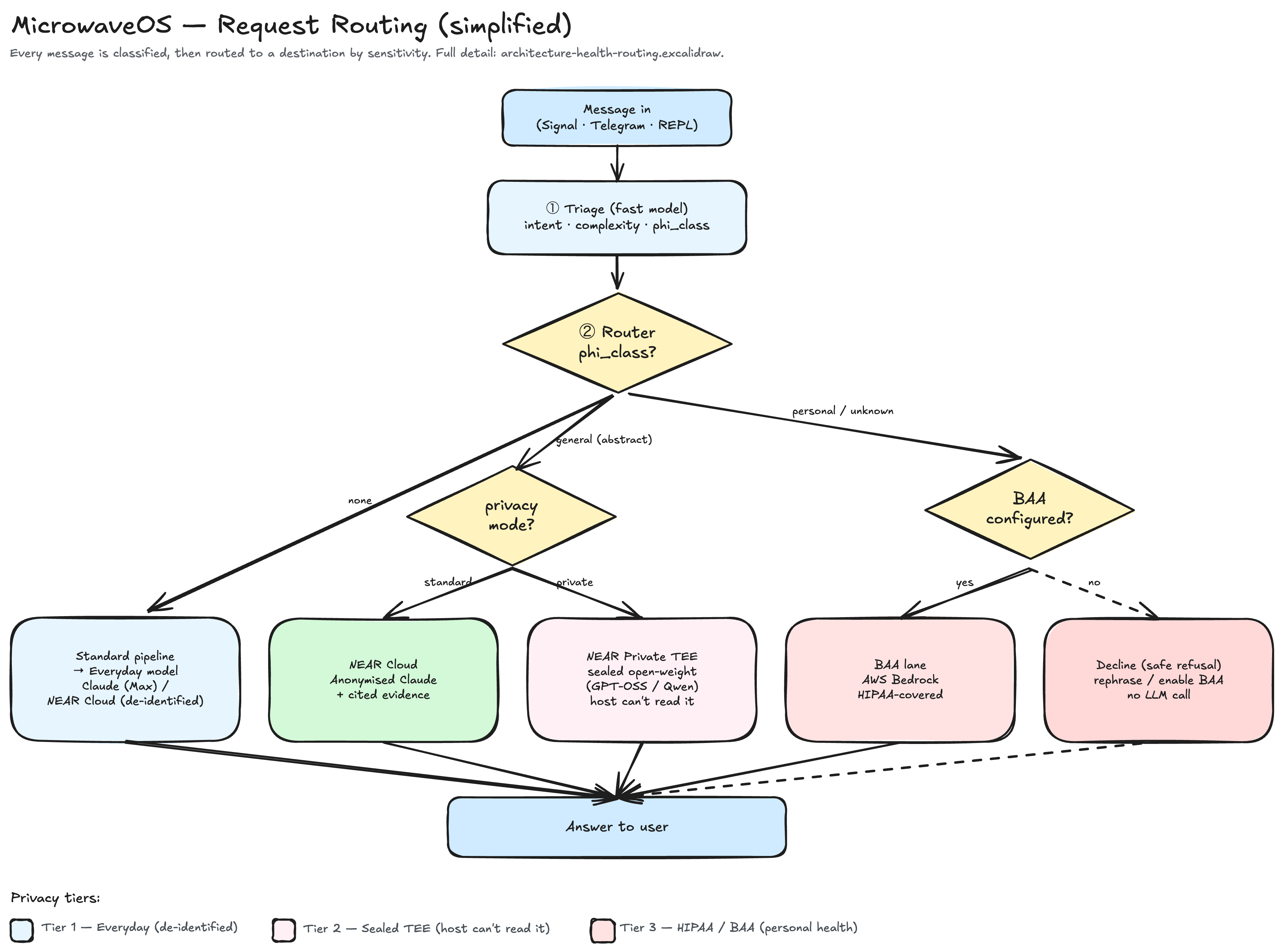
When you type into a normal AI chatbot, your words travel to one company’s servers and you take it on faith they’re handled well. For a tool I talk to about my actual life, my health included, “take it on faith” wasn’t good enough. So one of the central principles in Microwave is that not every message has to go to the same place. Different sensitivities get routed to different destinations along a privacy dial.
Tier 1 is the everyday path. Ordinary messages go to a strong general model, which is Claude. In my setup they can route through NEAR Cloud, a gateway that strips identifying details before passing the prompt upstream, so the provider sees a de-identified request rather than “Joe, at this account, asked this.” It’s the default lane: good quality with sensible hygiene.
Tier 2 is private and sealed, and it’s the one I’m most excited about. For things I want kept truly private, Microwave can route to NEAR’s Private TEE, open-weight models like GPT-OSS and Qwen running inside something called a Trusted Execution Environment.
Here’s the idea in plain English. Imagine sliding your question through a slot into a locked, soundproof room. A machine inside answers, the reply comes back out through the slot, and nobody, not even the company that owns the building, can open the room or hear what was said. That’s a TEE: the computation runs inside sealed hardware the host itself can’t peek into. Better still, the hardware can mathematically prove the room was sealed before you trust it, a step called attestation, which turns the usual “trust us, we won’t look” into something stronger: “we can’t look, and here’s the proof.” For a personal assistant, that’s a different category of privacy.
Tier 3 is the medical lane, which runs under HIPAA and a BAA. Personal health details are special in a legal sense. In the US, health data is governed by HIPAA, and any service that processes it on your behalf is supposed to sign a Business Associate Agreement, a contract that binds it to handle that data under medical-privacy rules. So when Microwave detects a personal health message like “is my dose too high?”, it routes to a provider running under exactly that kind of agreement, in my case Amazon’s Bedrock with a covered model. General health questions like “what does this drug do?” don’t need that lane, while personal ones do. The fail-safe is the part that matters most: if no covered provider is configured, Microwave refuses rather than guesses. It tells you it can’t safely handle personal health details and asks you to rephrase in the abstract or enable a covered path, because declining beats leaking.
The takeaway, even if you never write a line of code: treat privacy as a routing decision rather than a single setting. The grown-up version of “is this private?” replaces the yes-or-no with a better question, which is “how sensitive is this, and where should it go?” Most software treats every byte the same. Building deliberate lanes (ordinary, sealed, legally covered) and sending each thing down the right one is a healthier way to handle anyone’s information, including your own.
Lesson 1: “I can’t do that” is often a lie the software tells itself
I sent Microwave a PDF of some lab results. It replied, politely, that it couldn’t read PDFs and I should paste the text instead.
The obvious conclusion is “the bot can’t read PDFs, go add that feature.” When I dug in, the truth was sneakier. Nothing was refusing PDFs by design. When a file arrived, the code forwarded only a small label to the model, something like “a file named labs.pdf, 42 kilobytes,” and never the contents. Handed a name and a size and nothing else, the model did the honest thing and said it couldn’t read what it had never been given. The model was improvising an excuse to cover for information that never reached it, with no policy involved anywhere.
This is a trap I now see everywhere. When a system says “I can’t,” the real question is usually whether the thing it needs even reached it. The fix had nothing to do with teaching it to allow PDFs. I extracted the text from the file, ran image recognition on the scanned documents that are really just photos of paper, and handed that to the model. After that it could read lab results, statements, whatever I sent.
The general lesson: before you accept a tool’s stated limitation, check whether you actually gave it what it needed. Half the “it can’t do X” problems in life are really “X never made it to the part that does the work.”
Side note: what Microwave actually searches for information
A fair question is where all this information comes from, so here’s the honest inventory.
For medical and scientific literature, the default is Europe PMC, a single index that covers PubMed and MEDLINE, the PMC full-text archive, and preprints from medRxiv, bioRxiv, and Preprints.org, which now arrive flagged as preprints so I know when something hasn’t cleared peer review yet. There’s an alternate search backend that goes straight to PubMed through NCBI’s E-utilities when I want it. When Microwave fetches one specific article rather than a list, it uses NCBI’s BioC service to pull open-access full text and checks Unpaywall to find a legal free version of a paywalled paper by its DOI.
The health Q&A module has its own, older evidence path that overlaps a little with the above. It draws on PubMed for peer-reviewed abstracts and on MedlinePlus, the National Library of Medicine’s plain-language consumer health source, to ground its cited answers. A few more sources sit scaffolded in the code but aren’t wired up yet. openFDA, CDC, and ClinicalTrials.gov are placeholders I left myself, aspirational for now.
For the open web, DuckDuckGo is the only live search backend at the moment. A separate fetch tool grabs any specific public URL that I or the model point it at.
Last, Microwave searches my own data, which counts as a search even though it never leaves my machine. That covers MEMORY.md for long-term facts, recent conversation turns, daily notes, session summaries, and the content of whatever project is active, all through the same hybrid meaning-plus-keyword search the rest of the system uses.
Two things worth knowing. The literature tool and the health module both touch PubMed, but they run on different code paths: the first is the agent’s general literature tool with Europe PMC as its default and preprints included and flagged, and the second is the health module’s evidence layer that feeds the cited health answers. And Sci-Hub stays deliberately absent, as covered above, so every medical source here is sanctioned and legal.
Lesson 2: when something breaks, find the right layer
One afternoon Microwave went silent on Signal. I’d send a message and get nothing back, not even the little “read” checkmark, and naturally I suspected my own recent changes first.
This turned into a proper detective story, and the moral is one of the most useful things I know about fixing systems. The bot has layers: my code, a piece of middleware that talks to Signal’s network, and Signal itself. The temptation is to start where you were last working, which is your own code. But the symptom, no read receipt at all, was a clue that the message wasn’t even reaching my code. That pointed lower, at the middleware.
So instead of guessing, I ran a clean experiment. I stopped the bot, attached a bare listener to the exact pipe the messages come through, and sent a test. The message arrived, mangled, with an error buried inside it. That single observation collapsed a dozen theories at once. My code was fine and the network was fine, and the middleware was choking on the message and producing garbage that my bot correctly ignored.
It turned out a Signal server-side change that same day had broken the middleware for every user of that tool, worldwide. Bug reports were already sitting in the tracker from hours earlier. There was nothing for me to fix in my own code, so I waited for the upstream patch and set up a small job to apply it the moment it shipped, which it did a few hours later.
Two lessons here, both general.
Debug at the layer where the evidence points, not the layer you last touched. The instinct to blame your own recent work runs strong and is usually wrong.
Find the one experiment that rules out the most. I could have theorized for an hour. Instead, one clean test (sole listener, single message, raw data) answered the real question of whether the problem sat above or below that line. The strongest debugging move is to design the single test that cuts the remaining possibilities in half, not to stare harder at the code you already suspect.
Lesson 3: privacy lives in the architecture
This is the one I’m proudest of, and the one with the deepest lesson. It builds straight on the privacy lanes from earlier, the medical one in particular.
After getting it working for a while I then hit a bug. It happened after a personal health exchange that had correctly gone down the protected medical lane, I sent a vague follow-up to clarify who the questions were about, “it’s not me, I do have a picture though,” and Microwave acted like it had no idea what we’d been discussing. The reason was simple, the follow-up had no obvious health words in it, so triage filed it under the everyday lane, which had never seen the protected conversation. The lanes keep separate memories by design, and that separation is the whole point.
The obvious fix is to let the normal lane peek at the protected conversation so it stops getting confused. That fix would have been a disaster, because it would leak exactly the sensitive data the whole two-lane design exists to protect. While I was investigating, I found a quieter version of that leak already sitting in the code and closed it.
So the correct fix ran the opposite direction from the obvious one. Rather than sharing the protected context outward, I made the routing sticky. Once a conversation enters the protected lane, its follow-ups stay there, so the context never has to cross the boundary at all. That restored continuity on the safe side of the wall.
The lesson, for anyone building something that touches sensitive data is to treat privacy as a wall you route around rather than a feature you bolt on after the fact. And be suspicious of the obvious fix. When “just share the data so it’s less confusing” feels like the easy answer, that’s often the exact moment you’re about to undermine the thing you built. The convenient path and the safe path point in opposite directions more often than anyone would like.
What it all adds up to
If I pull back, a few principles run through every one of these stories.
Lead with a process. The triage-first pipeline is the spine of the whole thing, and it’s why Microwave manages to be fast and thoughtful at the same time.
Route by sensitivity. Not every message deserves the same destination. An everyday question, something I want sealed away, and a personal health detail go to three different places on purpose: ordinary, hardware-private, and legally covered.
Be honest about limits. The imperfect memory, the bugs, the occasional “I can’t do this yet” all beat pretending otherwise.
Make the defaults fail safe. When something goes wrong, it should break toward less harm, leaving you with a confused-but-private bot instead of a leaky one.
Meet people where they are. Waiting for someone to finish their thought is basic respect long before it’s a feature spec.
I’m still building. Next on the list is letting Microwave actually look at a medical photo through the protected lane, since the “I have a picture” from that earlier bug is still sitting unfinished. There’s always a next thing, which is most of the fun of building tools you actually live with.
The bigger takeaway for myself is that you don’t have to accept software as a black box handed down from a company. The interesting, humane, genuinely-yours version of these tools is buildable, and building it teaches you as much about thinking clearly as it does about writing code.
Microwave is just the appliance I trust to do one job without drama, which is roughly the bar I set for the assistant.
I have written about this extensively. I suggest you start with the posts covering AI memory and AI pre-game routines. Also there is more on memory and retrieval.